This post is written by Vijay Menon, Principal Solutions Architect, and Christian Silva, Senior Solutions Architect.
Today, we announced Amazon API Gateway REST API’s support for private integration with Application Load Balancers (ALBs). You can use this new capability to securely expose your VPC-based applications through your REST APIs without exposing your ALBs to the public internet.
Prior to this launch, if you wanted to connect API Gateway to private ALBs, you would have had to use a Network Load Balancer (NLB) as an intermediary, increasing cost and complexity. Now, you can directly integrate API Gateway with private ALBs without requiring an NLB, reducing operational overhead and optimizing cost.
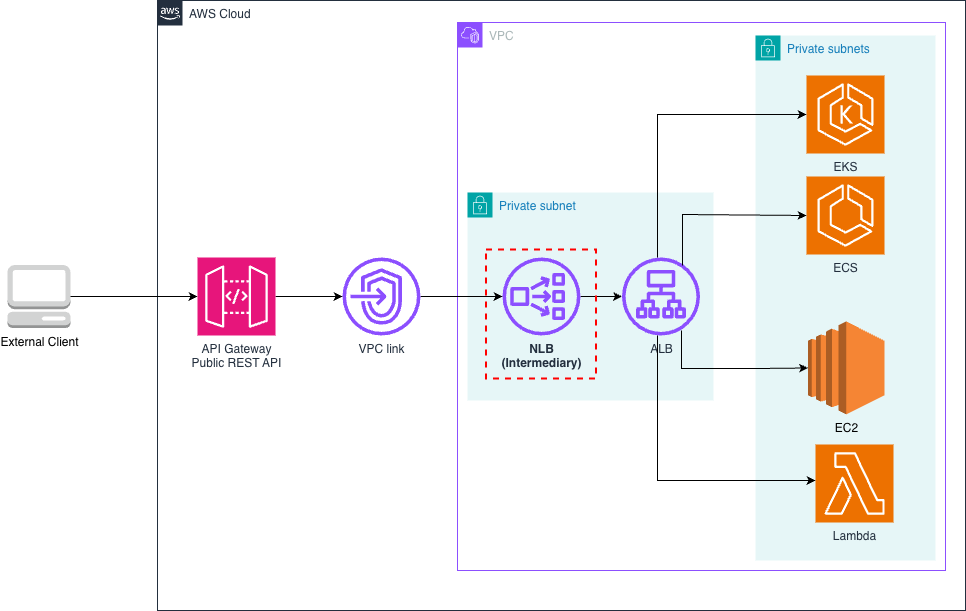
Before this launch, API Gateway REST APIs connect to private ALB resources through an NLB positioned in front of the ALB. Many customers have successfully built and operated production workloads using this architecture, demonstrating its reliability for business-critical applications. The following architecture demonstrates this setup.
Figure 1. Previous architecture: API Gateway to private ALB via intermediary NLB
In response to customer feedback for a simplified architecture and reduced costs, we’ve extended VPC link v2 support to REST APIs. This feature now enables direct private ALB integration for REST APIs, eliminating the need for an intermediary NLB.
With direct private ALB integration, this architecture becomes simpler and more efficient. The integration removes the need for an intermediate NLB, reducing the number of hops between client and your services. This streamlined setup simplifies the architecture for applications, allowing more efficient use of ALB’s layer-7 load-balancing capabilities, authentication, and authorization features. While these ALB features were technically accessible before, the new architecture removes the overhead and complexity of managing an additional NLB. Here’s how the simplified architecture looks now:
Figure 2. Direct integration between API Gateway and private ALB
This tutorial demonstrates the setup using both the AWS Management Console and AWS Command Line Interface (AWS CLI). Before you begin, make sure that you have an internal ALB configured in your VPC. For resources that need naming, use appropriate names for your environment.
Step 1: Create a VPC link v2
The first step in our process is to create a VPC link v2, which will enable API Gateway to route traffic to your internal ALB. Here’s how to set it up:
Alternatively, you can create a VPC link v2 using the AWS CLI:
Step 2: Create a REST API and configure integration
With your VPC link v2 now available, the next step is to create a REST API and configure it to use the VPC Link. This process involves creating the API, setting up resources and methods, and configuring the integration with your internal ALB.
Using the AWS CLI:
Step 3: Deploy and test
With your API configured, it’s time to deploy it and verify that it’s working correctly.
Test your API using your preferred API client or a simple curl command.
Using the AWS CLI:
Test your API integration using a curl command:
curl https://<rest-api-id>.execute-api.<your-aws-region>.amazonaws.com/internal-alb
 {"message": "Hello from internal ALB"}
Step 4: Scale your VPC link v2
A single VPC link can now connect to multiple ALBs or NLBs within your VPC, simplifying infrastructure management. This AWS CLI snippet demonstrates API Gateway integrating with multiple internal services, for example orders and payments services, each behind its own ALB, using a single VPC link v2. Note how the same VPC link ID is used across both integrations.
For a detailed, step-by-step guide, please see our official documentation in the API Gateway Developer Guide.
Private ALB integration with API Gateway enables architectural patterns that solve enterprise challenges. These are three key scenarios where organizations can use this new capability:
Direct private integration between API Gateway REST APIs and ALBs enhances API architecture on AWS. By simplifying infrastructure and reducing operational overhead, this capability improves performance and efficiency for API-driven applications.
This feature is available today in all AWS Regions where VPC link v2 and ALBs are present. We can’t wait to see what you build with it and how it transforms your API architectures. Get started now by visiting the API Gateway console and creating your first VPC link v2 for direct ALB integration.
For more information, visit the API Gateway product page, review our pricing details, and explore the comprehensive developer documentation to learn about all the powerful features available to help you build world-class APIs on AWS.