At AWS re:Invent 2024, AWS Marketplace introduced an integration with EC2 Image Builder. This feature enables Independent Software Vendors (ISVs) to deliver Amazon Machine Image (AMI) products in AWS Marketplace using EC2 Image Builder components. The integration helps increase customer adoption by providing a new delivery method and expands product visibility in the EC2 Image Builder console. ISVs can now create and package software components into their AMI-based products using EC2 Image Builder.
To further support ISVs, AWS provides intelligent assistance through Amazon Q, which integrates with the Amazon EC2 Image Builder Management Console to deliver real-time, contextual code suggestions while you write YAML documents for Image Builder components.This helps speed up the definition of build and test phases, input parameters, and metadata, while reducing syntax and logical errors. For parameter management, Amazon Q suggest best practices for structuring input parameters, helping you create configurable and reusable components that work across different customer environments. During development, Q’s validation features identify schema and compliance issues early, shortening debugging cycles and helping make components meet AWS Marketplace requirements.
This post shows how AWS Marketplace sellers can use EC2 Image Builder and Amazon Q to simplify creating AMI-based products. You’ll learn two approaches: using existing components and creating custom components with AI assistance. This guide will help you improve your product development process and build secure AMIs for AWS Marketplace.
This guide shows you how to create EC2 Image Builder components using two approaches:
Amazon Q helps streamline these workflows by providing contextual suggestions for common tasks, such as:
Figure 1: Component Creation Workflows With and Without Amazon Q.
While Amazon Q accelerates YAML authoring and validates documents against known schemas, it’s important to understand that this validation is static. Amazon Q checks for structural accuracy, syntax, and common best practices, but it does not execute your component to verify real-world behavior.
In practice, this means:
Best practice: After generating or modifying a component with Amazon Q, run it through a full EC2 Image Builder pipeline test in your target Region(s) and OS configurations. Validate security-sensitive steps—such as AWS Secrets Manager retrieval or SecureString parameter use—under real conditions before submitting your component to AWS Marketplace.
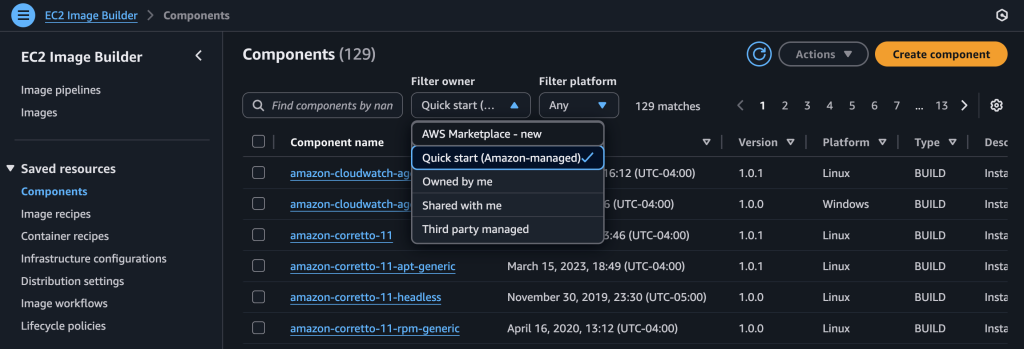
As an AWS Marketplace seller, you can save time by customizing an existing EC2 Image Builder component. You can modify an Amazon-managed Quick Start component to match your software requirements. To create a custom component from an existing template:
Figure 2: Available EC2 Image Builder Components
Figure 3: CloudWatch Agent Component YAML Configuration
You can use this custom component in your AMI build pipeline using EC2 Image Builder.
When preparing components for AWS Marketplace, you need to address several key requirements. If your software requires sensitive credentials or configuration values, your components must securely retrieve them using AWS Systems Manager Parameter Store or AWS Secrets Manager. They should include default parameter values to pass AWS Marketplace validation. For reliable software installation, use AWSTOE actions like S3Download to retrieve assets consistently. Before submission, fully test your components in the US East (N. Virginia) Region. To reach more customers, consider making your components compatible with multiple operating systems.
Amazon Q can help you meet these requirements by generating appropriate YAML configurations. When you need to create a component that downloads files from Amazon S3, you can ask Amazon Q to create a Linux component that uses the S3Download (for assets stored in Amazon S3). Another way is WebDownload (for ISVs who host their software outside of S3) actions to retrieve assets consistently. Your prompt might ask for a component that downloads from a static path in the US-East -1 Region, saves files to a specific directory, and includes validation steps to confirm successful installation.
Figure 4: Example of using Amazon Q to generate a S3Download action
When building components that handle sensitive information like database credentials, proper security implementation is crucial. AWS Secrets Manager provides a secure way to manage and retrieve these credentials during the component build process, and you can also use AWS Systems Manager (SSM) Parameter Store to retrieve secrets securely. For example, you can reference an AWS Secrets Manager secret using an SSM SecureString parameter:
{{ aws:ssm:/aws/reference/secretsmanager/test/test-secret }}
This approach minimizes the risk of exposing sensitive information in your component configurations and helps you meet AWS Marketplace security requirements. The SSM Parameter Store integration offers significant advantages. It works seamlessly across all supported systems because AWSTOE includes built-in SDK support for API calls. This eliminates the need for AWS CLI installation, which is particularly beneficial for Windows systems where CLI tools aren’t available by default.
By integrating AWS Secrets Manager or SSM Parameter Store into your components, you can manage credentials independently from your component code. This means you can update passwords and other sensitive values without rebuilding your components. Both integrations provide proper access control through IAM permissions.
You can use Amazon Q to help create components that implement these security best practices. When requesting help with credential handling, specify how you want to retrieve values—via Secrets Manager directly or through SSM Parameter Store—implement proper error handling, and use SecureString parameters. Remember to include the default parameters required for AWS Marketplace validation.
Figure 5: Example of using Amazon Q to retrieve Configuration value
EC2 Image Builder components often need to access sensitive information like database credentials during software installation. Rather than embedding these credentials directly in your component configurations, you can use AWS Secrets Manager to handle them securely. This approach helps protect your sensitive data by retrieving secrets at runtime, keeping them out of component definitions and log files.
AWS Secrets Manager integrates with your components through IAM permissions, allowing you to control exactly which components can access specific secrets. This means you can update credentials whenever needed without rebuilding your components, and you can track who accesses these secrets through AWS CloudTrail.
To help you implement these security patterns, you can use Amazon Q. When you prompt Amazon Q to create a component that uses AWS Secrets Manager, it generates YAML that includes secure credential retrieval, proper error handling, and the required parameter schemas for AWS Marketplace validation. The generated code demonstrates how to safely retrieve and use credentials during installation while maintaining the security standards required for AWS Marketplace components.
Figure 6: Example of using Amazon Q to retrieve credentials from AWS Secrets Manager
As shown in these three examples, AI assistance can help accelerate development, but it’s crucial to maintain security and compliance standards through proper review and testing procedures. While Amazon Q can help streamline authoring by suggesting YAML structures and patterns, its recommendations are based on language models rather than a complete, context-aware understanding of AWSTOE capabilities. This means Q may occasionally suggest unsupported or incorrect actions—for example, inventing actions like DownloadFile or ExtractArchive that do not exist in AWSTOE, even when provided with official documentation links.
Because of this, you should treat Q’s output as a starting point rather than final, production-ready code. Always cross-reference suggested actions with the official AWSTOE action reference and run a full test build to validate syntax, action availability, and runtime behavior.
For example, when integrating with Amazon S3, you can parameterize the S3 bucket and object key so your component can fetch scripts or assets dynamically—but you must use a supported retrieval action (S3Download or WebDownload).
The integration of EC2 Image Builder with AWS Marketplace is transforming how AMI-based products are built and delivered—not just for AWS Marketplace sellers, but for any organization building AMI-based solutions. EC2 Image Builder components are evolving to meet enterprise security, compliance, and operational needs across industries. Building on the secure credential management and validation patterns covered earlier, customers are creating components that implement these practices for endpoint security, threat detection, and compliance monitoring. These components often leverage AWS Systems Manager Parameter Store and AWS Secrets Manager for secure configuration management, while meeting AWS Marketplace validation requirements when applicable.
Amazon Q can help accelerate the authoring process but always validate its output against official documentation and through full pipeline testing. By combining automation with rigorous review, you can create Image Builder components that are both efficient to produce and trusted in operation.
Elhadj Barry is a Marketplace specialist partner solutions architect, based in Washington, DC. With deep expertise in cloud architecture, he helps organizations optimize their AWS Marketplace implementations while ensuring robust security controls and compliance. His innovative approach to solving complex technical challenges has consistently delivered measurable business outcomes for enterprise customers.
Diego Colombatto is a principal partner solutions architect at Amazon Web Services (AWS). He brings more than 15 years of experience in designing and delivering digital transformation projects for enterprises. At AWS, Diego works with partners and customers advising how to leverage AWS technologies to translate business needs into solutions. Solution architectures, algorithmic trading, and cooking are some of his passions and he’s always open to start a conversation on these topics.
Wendy Sikirat Jabitta is a Senior Technical Business Development Manager at Amazon Web Services (AWS). She works with AWS technology partners to develop joint solutions, drive go-to-market strategies, and accelerate customer adoption. Outside of work, Wendy is passionate about wellness and enjoys competing in fitness challenges.